



The Apple iPhone 17 Pro Max needs no introduction. It’s the latest iPhone, Apple calls it their “best ever yet” every year, and people snap it up. End of story, right? Not exactly. The iPhone 17 series actually marks a significant shift in Apple’s approach.

The company seems intent on providing some solid hardware across every model, whether it’s a great baseline (iPhone 17), lustworthy design, and incredible engineering to miniaturize the components for a future model, even with compromises (iPhone Air), and then a device that actually caters to creatives (iPhone 17 Pro).
And considering how much the iPhone 17 Pro Max costs, starting at a princely Php 86,990 (Apple.com retail pricing) for 256GB, it’s easy to dismiss it as “yet another big iPhone”. But if you’re an enthusiast or a creative who’s looking to get one of these, is Apple’s asking price really worth all the “Pro” features it brings to the table, or is it just another way for them to upcharge for hardware that can be found elsewhere for less?
Design

Fans may lament the switch to a less premium material after several generations of using stainless steel and titanium, but I can assure you that the aluminum body feels just as premium as its other phones, considering Apple makes almost all of its other devices out of it.
The 17 Pro Max comes in at a hefty 233g, meaning that this will weigh down anything you put it in. The shape may appear boxy, but the weight is well distributed, and soft, rounded edges make it relatively comfortable to hold.

It comes in three colors: Silver, Cosmic Orange, and Deep Blue. The first one, in particular, is in demand due to early reports of the other two hues discoloring and being easily damaged, exposing the bare aluminum underneath. However, the IP68 dust and water resistance means it’s not as fragile as you think it is.
The rear of the phone houses the new “camera plateau” that clearly has taken some inspiration from the Google Pixel, but it’s massive for a specific reason: to house the new triple camera setup, alongside a rearranged flash, microphone hole, and LiDAR sensor on the far right.


Underneath that is a glass “window” that’s made from Apple’s proprietary Ceramic Shield material to allow for magnetic wireless charging. It’s frosted for a silky-smooth texture, and at least on the Silver model, finished in white. Finally, the bottom houses the speaker grille (now moved left), the USB-C 3.2 port, and the microphone grille.
In an era where device makers remove physical buttons, it’s surprising to see Apple add a few back around the iPhone. The left side houses the remappable action button above the volume buttons, and the right side has the power button and the camera control button.
For those unfamiliar, this is a capacitive button that launches the Camera and Visual Intelligence functionality, and you can swipe, half-press, and tap for additional functionality. Most people do find the higher-up placement of the button awkward to use, but for me, it’s comfortable, especially if you have bigger hands.
However, it’s nothing like the two-stage shutter buttons found on older Nokia and Sony Xperias, with the physical click sometimes inducing camera shake, hence some people treat it as a dedicated shortcut.
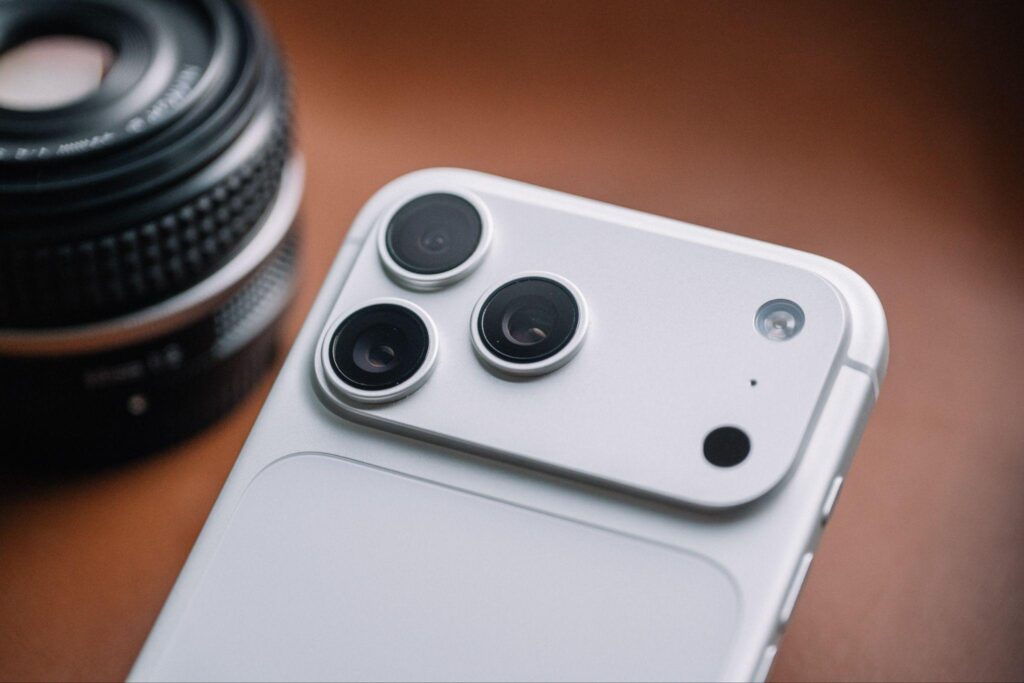
My device was purchased in Japan, hence it has a plastic strip at the top for the mmWave 5G antenna and no physical sim card slot, but otherwise, Philippine devices should have the slot on the left-hand side of the phone.
Display

The reason you go for a Pro Max device is to have the biggest possible screen without having to settle for an iPad Mini. Underneath the Ceramic Shield 2 with an anti-reflective coating is a 6.9-inch LTPO OLED screen.
It has a resolution of 1320×2868 and has an adaptive refresh rate of 1 to 120Hz, meaning that it is very energy efficient, and enables the ability to have a full screen always-on display (AOD). Apple calls this the Super Retina XDR display, allowing for up to 3,000 nits of brightness, and the capability to dip to 1 nit (using accessibility settings).

Apple’s screens are considered to be the benchmark for a sharp, color-accurate display, and the 17 Pro Max will most likely be the best display that you will own in your house unless you have professional equipment.

The anti-reflective coating may not be as effective as the one found on the Galaxy S25 Ultra, but it does help cut down on stray reflections and make it easier to use outdoors, especially when the high brightness mode kicks in. However, put a screen protector on, and you lose it entirely. There are accessory manufacturers who do make glass protectors with anti-reflective coatings on them, but they cost a little more than your usual protector.
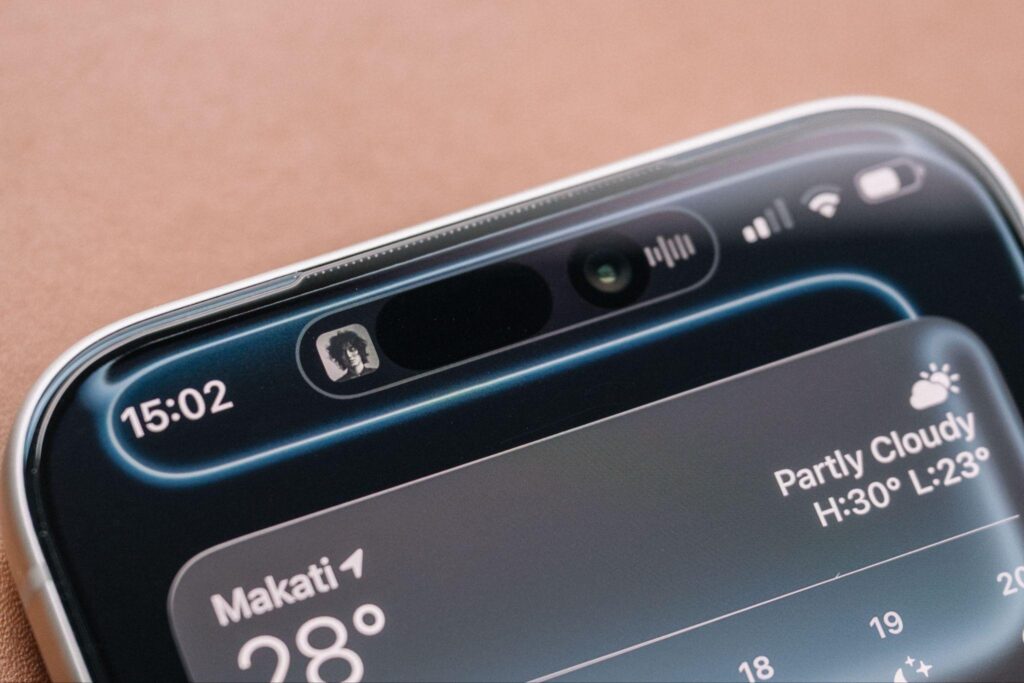
Finally, the dynamic island sits up top, a software-interactive camera cutout that holds the hardware for the FaceIDbiometric system. No fingerprint scanning here, but in today’s post-COVID world, facial authentication is one of the most convenient ways to secure your device.
Camera

If there’s a device that takes the cake for the most consistent camera system, it has to be the iPhone. All three sensors are now 48MP, and are fairly large, only beaten out by the 1-inch sensors found in China’s “Ultra” flagships.
The wide lens is a 24mm equivalent with an aperture of f/1.8, and the ultrawide lens is a 13mm equivalent with an aperture of f/2.2. Finally, the new telephoto is a 4x optical zoom with a 100mm equivalent with an aperture of f/2.8. Both the wide and telephoto lenses also have sensor-shift OIS, a more effective version of image stabilization.
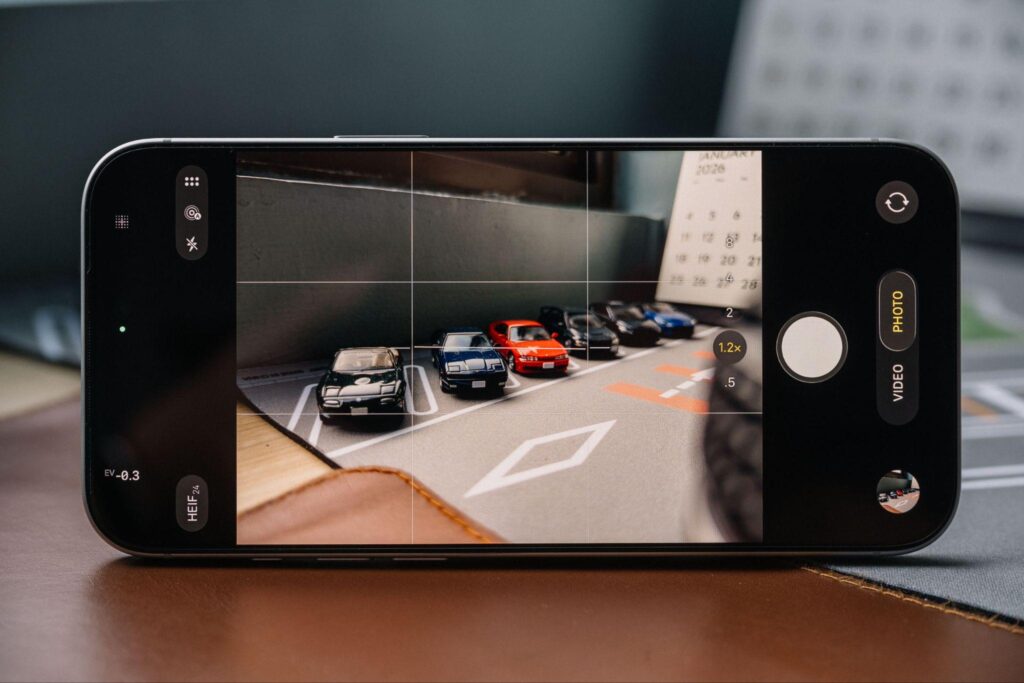
Apple’s marketing materials say that the 17 Pro series has “six lenses” in it, and they do it by cropping in the wide and telephoto lenses, allowing you to have a 28mm (1.2x), 35mm (1.5x), 50mm (2x), and a 200mm (8x) equivalent without having additional physical lenses. These undergo a degree of processing, so these aren’t “true” optical crops.


Daytime photography is great, as expected. Sharp, clear images with autofocus that you don’t have to think about (unless you’re shooting through a window). These large sensors also allow for some degree of natural depth of field to creep in, especially with the new 4x telephoto lens, to a point where some shots look as if they were taken on a proper camera.


Night time photography is a breeze too, but most of the time, you’ll either be relying on the phone’s auto-triggering night mode, which does get annoying if you need to get a quick snapshot. Otherwise, there are no other manual controls available other than being able to turn it off entirely, or to max it out if you find a surface stable enough to let it sit for more than three seconds.

The great hardware is complemented by a solid camera processing pipeline. By default, iPhone photos have a distinctive, neutral “HDR” look that flattens out details in the shadows and highlights, where you can see everything, with less aggressive sharpening compared to previous generations. But the Photographic Styles functionality allows you to customize the post-processing.
Without going too much into detail, you can essentially make the camera shoot how you want it to look, and it can be adjusted after. Don’t like the HDR? You can get rid of that and bring back dark shadows. More vivid or less saturated colors? You got it. Warmer or cooler tones? Go ahead.

The camera also allows you to shoot in Apple’s ProRAW file format, which allows you to take photos and edit them with the same amount of flexibility as a proper camera’s RAW files do, just with Apple’s computational photography touch baked in.


And if that’s not enough, Apple allows you to pick the resolution, with the device shooting 24MP JPEGs by default. You can also take 12 or 48MP photos across all lenses with the High Efficiency Image Format (HEIF) to save on space.


The clever square sensor selfie camera allows you to take landscape photos and videos without rotating the device.
The best upgrade also comes in the form of the clever 18MP square sensor selfie camera. The square sensor allows the camera to smartly adapt to what is in the frame, zooming out when needed. This also allows you to take landscape photos and videos without physically rotating the device, too.
Then, the video recording is the best you can find on a phone. In fact, professionals swear on it, and Apple even granted it some truly professional features that most people won’t even touch, such as Genlock (a way to synchronize multiple cameras), Open Gate (full sensor video recording), and Apple Log 2 (raw, pro-grade video meant for editing), which requires you to plug in an external SSD to record footage to due to how large the files are.
But for most of us, the iPhone 17 Pro series can record video in 4K from 24fps all the way to 120fps, Dolby Vision HDR, spatial audio recording, and Dual Capture, a function that allows you to record footage from both the front and rear cameras.
The iPhone comes out with the cleanest footage from a smartphone, even in low light. It has the smoothest lens transitions in video, incredibly stable footage without using the action mode, and the built-in audio is incredibly clean. However, I’ve encountered a bug where extremely windy situations would overwhelm the wind noise reduction algorithm, making the recorded audio sound like it was recorded underwater. You can get around this by using external microphones via the USB-C port, thankfully.

The dual capture functionality is also handy if you need to show footage from both sides; however, the most you can do is drag a window with footage from the second camera around, hindering creative possibilities.
It’s surprising considering how locked down Apple used to be, and having this flexibility, especially with third-party apps like Blackmagic Camera make the 17 Pro series a camera that can be relied on for proper creative work.
Performance

Apple’s iPhones have always been some of the fastest devices around, albeit susceptible to overheating. With this generation’s aluminum body and the introduction of a vapor chamber, Apple’s hexa-core A19 Pro can fully stretch its legs, especially when you consider that it comes with 12GB of RAM.
Your typical doomscrolling on social media, chatting, and typical light office work is something the phone does without any effort.
This phone is meant to chew through the likes of editing multiple RAW files on Lightroom, editing and rendering 4K 60 HDR video faster than your average laptop (unless you have a Pro/Max-equipped M-series MacBook), and it does it without breaking a sweat. The aluminum chassis may get warm to the touch, but that’s by design to prevent the processor from thermal throttling, something the Titanium-bodied 15 Pro and 16 Pros were notorious for.

The phone can easily tackle heavy games like Honkai: Star Rail, Zenless Zone Zero, and Wuthering Waves at max graphics. Of course, you’ll want to be reasonable and tone down the graphics if you want to play these games for longer.
The biggest downside to the inherent performance is the inability to multitask, and by extension, is also the fault of the software…
Software

iOS has been known as the platform where things “just work”. It’s a walled garden, something extremely limited compared to the openness of Android. As time passed, both platforms started adopting features from each other, coming to a point where both platforms are almost at a point of feature parity, save for a few things that go against Apple’s ethos.

iOS 26 has been met with mixed reception since its launch. While the new Liquid Glass aesthetic is a love-it-or-hate-it affair, especially with its legibility issues, it’s nice to see Apple open up more customization for users, allowing for a degree of almost Android-like personalization. However, it’s the general stability of the version that has drawn the most ire.

On a personal note, upon acquiring the 17 Pro Max last October, it was running iOS 26.0 out of the box, and I chose to set it up as a new device for the cleanest possible experience. On the way back to my hotel, I noticed my AirPods and Apple Watch would frequently cut out. Initially, I thought it was a defective device and was preparing to exchange the device, but I remembered that my previous iPhone had been through these exact areas without any issues.
Updating to iOS 26.1 RC did remedy this Bluetooth-related issue, but there are still a lot of bugs– whether visual glitches, battery draining issues, or experience-breaking ones that require me to force close apps or restart the device, even on the current 26.2 stable release (as of this writing).
It’s a shame, as there are some genuinely good improvements to the software brought about by iOS 26, and when the device works, it works great. The stereo speakers are loud and clear with some bass, and the signal strength and efficiency from the Apple N1 networking chip that brings Wi-Fi 7, Bluetooth 6, and Thread smart home protocol, is the best I’ve seen from a phone, and this isn’t even a local NTC unit.

Plus, the extremely half-baked implementation of Apple Intelligence doesn’t bode well. Siri, as a virtual assistant, is incredibly frustrating to use, with simple tasks and commands not being recognized. Clean Up in the Photos app is nifty, but falls behind Google and Samsung’s AI photo editing tools.

The Visual Intelligence feature is novel and allows you to search for items with your camera, but most of the other promised features aren’t even ready yet. And for Apple’s Live Translate feature, it gets awkward in practice as you and the person you’re talking to wait for the phone to process the conversation.

With the recent news of Apple working with Google to use Gemini as the basis for this year’s re-revamped Siri, we can only expect things to get better from here.
But if anything, iPhones hold their resale values the best as they’re known to have incredibly long software support, meaning you could theoretically hold onto an iPhone for a solid five to six years, sometimes even more.
Battery

This phone’s longevity is its strongest point. Philippine-market 17 Pro Maxes come with a 4823mAh battery, while eSIM-only devices (like mine) get a larger 5088mAh battery, besting the likes of the Samsung Galaxy S25 Ultra.
The 17 Pro Max can easily last a day and a half with normal usage, sometimes even stretching to two days if you’re careful and decide to go from 100 to 0% (you shouldn’t). In heavy usage, I would get around 7 to 8 hours, and that includes hour-long gaming sessions.
With supported chargers, the 17 Pro Max can charge up to 40W, allowing up to 50% of the battery to be added in just 20 minutes. Add 25W wireless charging and the ability to reverse charge other devices, and most of the iPhone’s previous slow charging pain points have been addressed.
Verdict

Despite the phone’s high asking price, the 17 Pro Max actually delivers the value users are looking for, and then some. Yes, it may have compromised in terms of the materials used for the construction, but in this case, Apple decided to make the Pro lineup abide by the philosophy that function follows form.
It has incredibly strong hardware to back it up and hopefully, withstand the test of time. Now, with newer versions of iOS 26 starting to address all of the previous issues from the initial release, Apple has the chance to make a device that will age well and be remembered as one of the great iPhones.
Photos by the author